
Why Should Insurance Agents Use Quote Snapshot?
In today’s digital world, clients expect a fast, convenient buying experience. After receiving a quote, they want the flexibility to review their coverage, compare options, and purchase when they’re ready, without waiting for lengthy email exchanges or downloading attachments.
That’s where Quote Snapshot comes in.
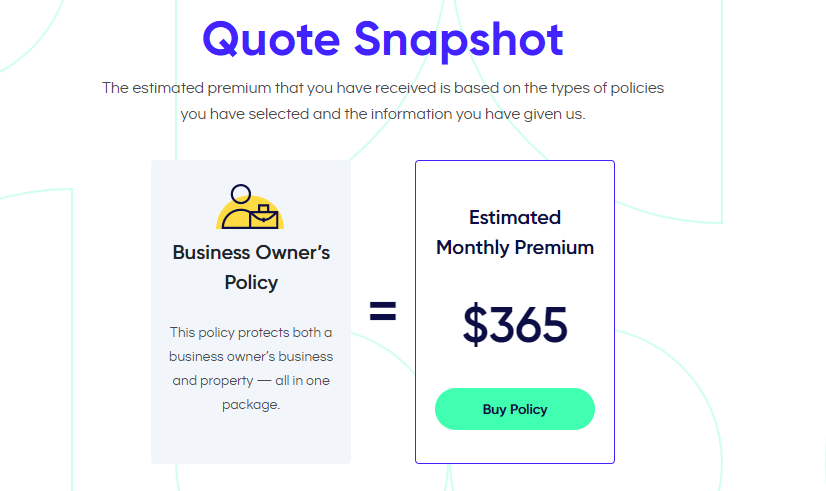
Quote Snapshot is a feature within the Coterie Dashboard that allows insurance agents to share a secure, bindable quote with clients using a simple link. Instead of downloading a PDF, agents can send an interactive quote that clients can review and purchase online at their convenience.
Whether you’re following up after a conversation, sending multiple quote options, or giving a client time to make a decision, Quote Snapshot helps streamline the quoting experience from start to finish.
What Is Quote Snapshot?
Quote Snapshot is a built-in feature within the Coterie Dashboard that creates a secure, shareable version of an eligible quote.
When a quote reaches Ready to Bind, agents can generate a unique link that allows their client to:
- Review proposed coverages
- View policy details
- See estimated premium
- Purchase coverage online when they’re ready
Because the quote is shared through a live webpage rather than a downloaded document, clients can easily access it from their computer, tablet, or mobile device.
Why Use Quote Snapshot Instead of a PDF?
Traditional quote PDFs work well for documentation, but they often create extra steps for both agents and policyholders.
Quote Snapshot provides a more convenient experience by allowing agents to send a live quote instead of an attachment.
With Quote Snapshot you can:
- Share quotes in seconds
- Eliminate PDF downloads and attachments
- Give clients the flexibility to review coverage on their own schedule
- Create a smoother buying experience
- Help reduce back-and-forth communication before binding
It’s a simple way to make the quoting process feel more modern while keeping your client at the center of the experience.
How to Share a Quote Snapshot
Sharing a Quote Snapshot only takes a few clicks.
- Complete a quote within the Coterie Dashboard.
- Navigate to the Review & Pay page.
- Copy the Quote Snapshot link.
- Send the link to your client by email, text message, or your preferred communication method.
Once your client opens the link, they’ll be able to review their quote and purchase coverage online when they’re ready.
What Your Client Experiences
The Quote Snapshot page is designed to make reviewing insurance information simple and straightforward.
Clients can:
- Review their quote
- Explore coverage details
- View estimated premium
- Purchase their policy securely online
This allows clients to move forward when it’s convenient for them while still giving agents visibility into the quoting process.
When Should Agents Use Quote Snapshot?
Quote Snapshot works well for nearly every quoting conversation, especially when clients need time to review their options.
Common scenarios include:
- Following up after a discovery call
- Sending multiple quote options for comparison
- Allowing business owners to review coverage after hours
- Providing an easy way to bind coverage without another meeting
- Giving clients a professional digital experience
Benefits for Independent Insurance Agents
Independent agents balance multiple clients and quoting opportunities every day. Quote Snapshot helps simplify one of the most important parts of that workflow.
Instead of creating attachments, explaining where to find information, or coordinating another call just to bind coverage, agents can send one secure link that gives clients everything they need to make an informed decision.
The result is a faster, more convenient experience for both you and your clients.
Ready to simplify how you share quotes with your clients?
Log in to the Coterie Dashboard, create your next quote, and use Quote Snapshot to deliver a fast, convenient quoting experience.
Frequently Asked Questions
Can I email or text a Quote Snapshot?
Yes. Quote Snapshot can be shared however you normally communicate with your clients, including email or text message.
Is Quote Snapshot available on every quote?
Quote Snapshot is available for eligible quotes that have reached Ready to Bind within the Coterie Dashboard.
Can clients purchase coverage directly from Quote Snapshot?
Yes. Clients can review their quote and complete the purchase online when they’re ready.
Does Quote Snapshot replace PDF quotes?
Quote Snapshot offers a modern alternative for sharing eligible quotes digitally. Agents can choose the sharing method that best fits each client and situation.